
Home | Store | Contact | Videos | Privacy Policy

How to fix Samsung Galaxy S Unsuccessful Android Market Download and System Restore Issue

137 Comments » | This post was viewed 171451 times.

If your android mobile is unable to download android apps stating “download unsuccessful” or started showing system restore issue on factory format then here is some trick for you. I tested this on Samsung Galaxy S GT -I9000 and successfully recovered the Market Download and System Restore Issues.

What is the Issue?

Updating an app or downloading a new apps from android market is unsuccessful:
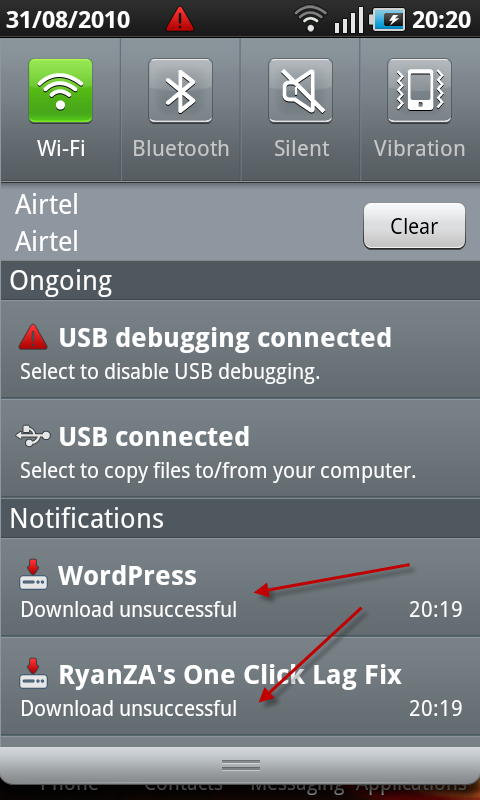
How to fix Samsung Galaxy S Market Download and System Restore Issue

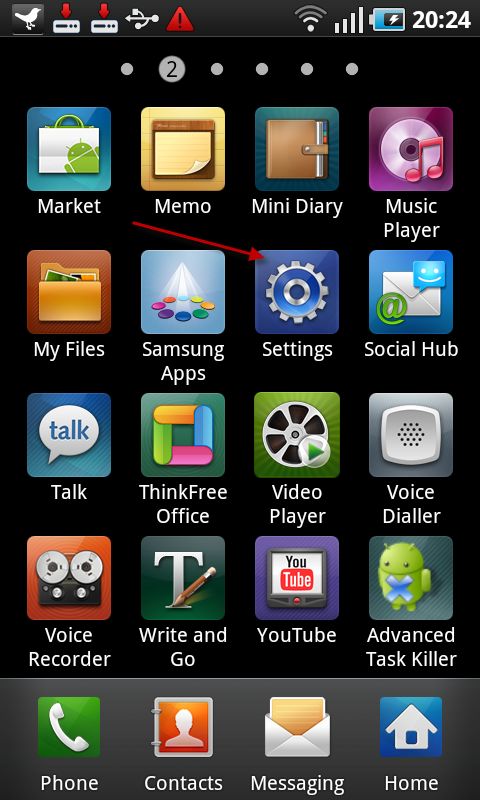
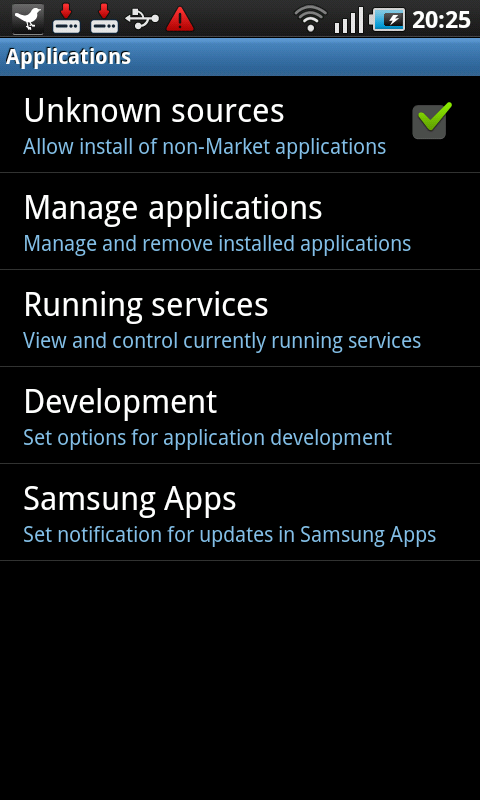
Step 1. Go to your settings
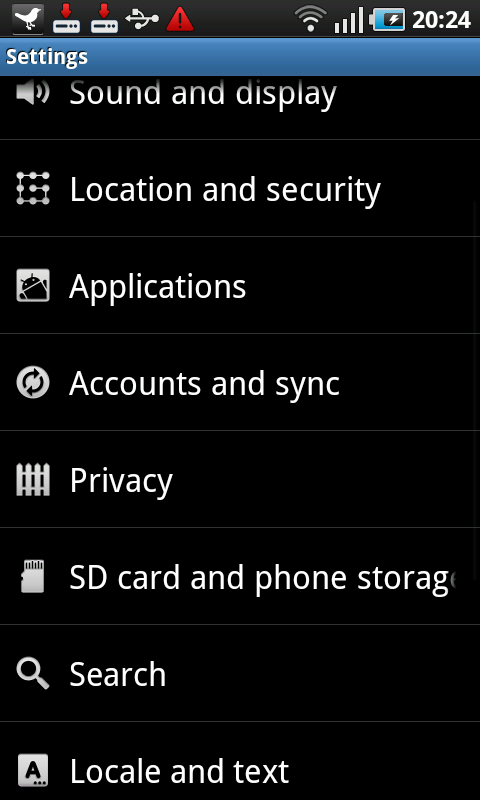
Step 2. Select “Applications”
Step 3. Select “Manage Applications”
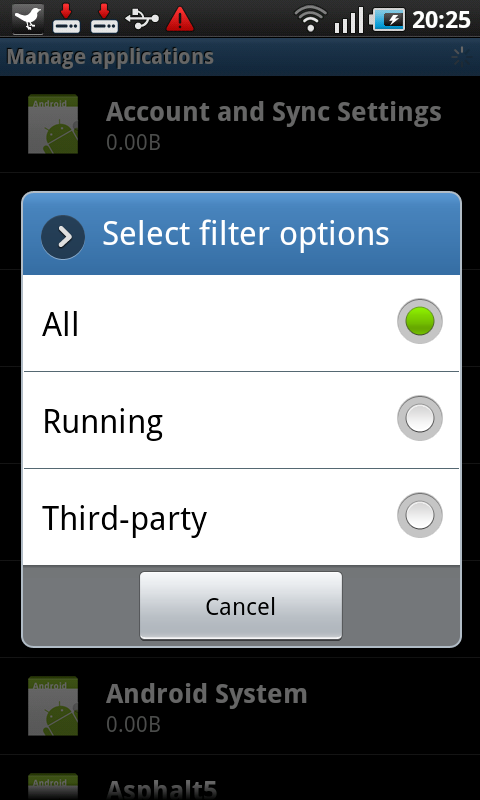
Step 4.Press left menu and select “filter” then “All”
Step 5. Most important

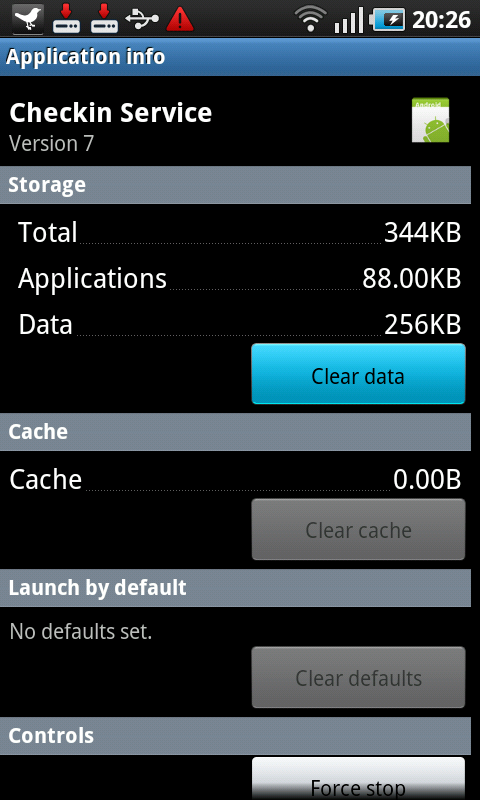
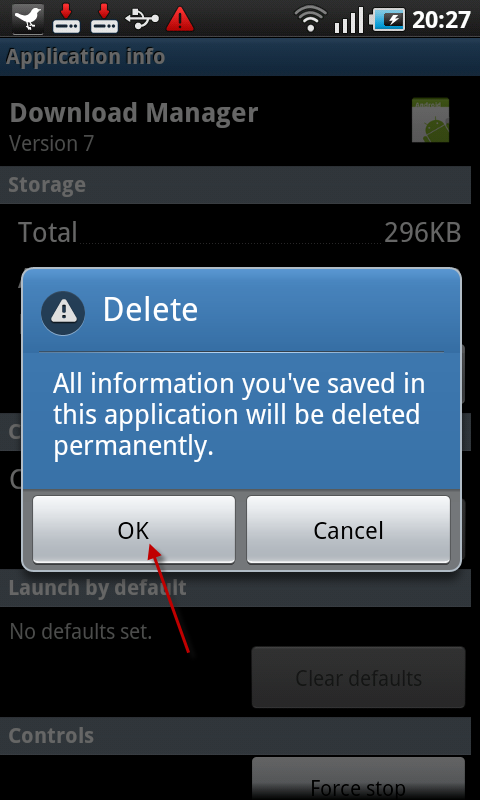
Go and scroll down to following applications and then clean the data

a) Go to “Checkin Service” then select “clear data”
b) Go to “Download Manager” then select “clear data”
c) Go to “Google Apps” then “clear data”

d) Go to “Google Talk Service” then select “clear data”
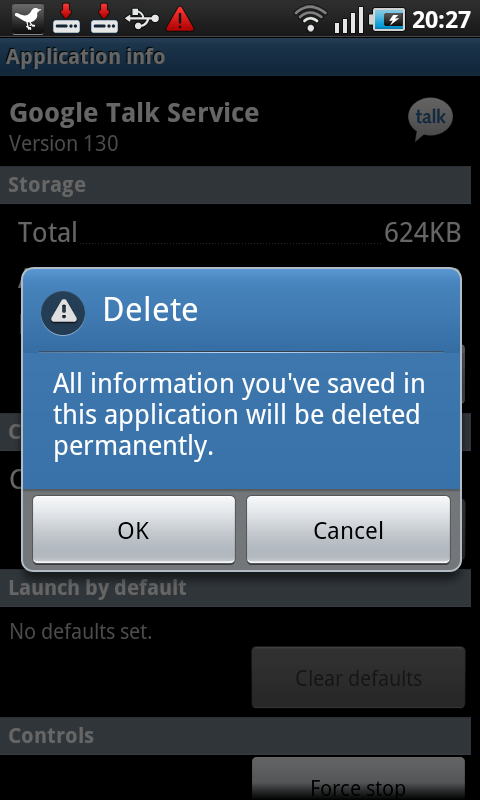
e) Go to ” Market” then select “clear cache”

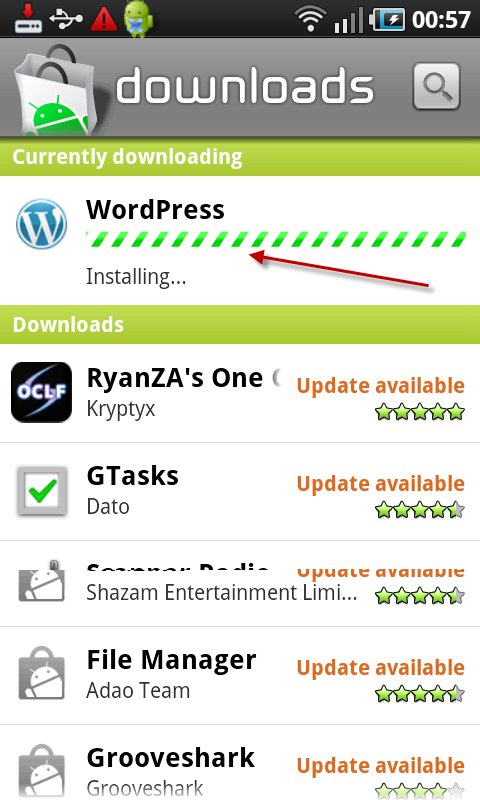
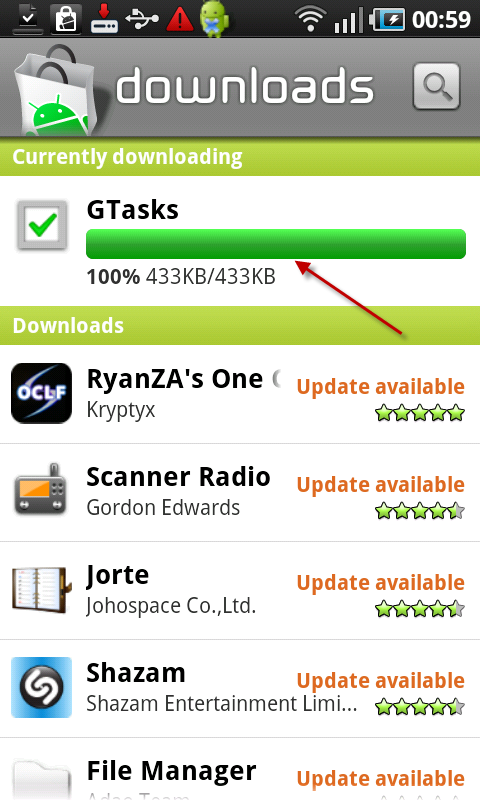
Final results after the above mention fix

WordPress for android is Installing now
Gtasks for android in downloading successfully now
There are more than 30 Free Google Android Applications and in case you have another issues then you can also check our mobile section where you can easily get the fixes like how to enable paid apps in android market of your mobile , how to root and un-root android mobiles and devices in One Click and even how to boot the android mobile device into recovery mode .


You can follow any responses to this entry through the RSS 2.0 feed. You can leave a response, or trackback from your own site.

137 Responses to “How to fix Samsung Galaxy S Unsuccessful Android Market Download and System Restore Issue”

  1. THANK YOU.

    finally got app downloads working on my epic with these instructions

  2. This is just amazing!! it worked so well and Thanks a lot for the help honeytechblog… even the google could not give me any fix.. :)

  3. You’re my hero. Seriously. Samsung couldn’t fix it & told me to return the phone as defective.

  4. thanks a mill

  5. Thank you! It works! :)

  6. Great thanks a lot…it worked… :)

  7. WORKED GREAT!

  8. Wow, at last… something that really solves the problem! Thank you, my SGS is downloading well again!

  9. @Sarah
    I’m happy that Android market issue is fixed for you :)

  10. happy camper Says:

    worked perfectly… THANKS!

  11. NOT USEFUL AT ALL, DID NOT FIX PROBLEM!

  12. fixed my unsuccessful download for samsung galaxy s perfectly! thanks!

  13. Fixed the problem I was having with my Epic. Thank you.

  14. Just to put these number in perspective, Apple sells 8M iPhones a quarter. If Samsung really manages to sell 10M Galaxy S by the end of the year, it’ll sell around 30% as many Androids as Apple sells iPhones. Now, apple might increase the iPhone sales rate, but we need to remember that the Galaxy only came out in the second quarter.
    Very impressive achievement for Samsung.

  15. Oh my gosh! This saved my phone! Thank you so much! I just got my samsung epic two weeks ago so I thought I had done something that messed it up. This works perfectly! Thank you so much!

  16. Awesome! Thanks so much :-)

  17. hey thankzzzz a milln…..it works gr8……

  18. Worked for me too: Samsung Epic, Android 2.1

    Thanks!

  19. BINGO !! IT REALLY WORKS !!!
    You’ve made my day. Thanks. I’ve been moaning for weeks all over the Google Help forums. I’ll post your link there if that’s OK ??

  20. nope, did not work for me (epic 4g

  21. I do hate the fact that the clearing the cache of the Market app makes it forget what you have downloaded before and what you haven’t.

    So I ran a test just now.

    Clearing up the Checkin data and the Download Manager data on my phone (Samsung Galaxy S) fixed up the problem. Didn’t have to touch the GTalk or Market apps cache at all!

    Just thought you would like to know

  22. step 4: how do you get to “left menu”? Thanks

  23. Thanks so much :-)

  24. I found what worked for mine in this case is unchecked unknown sources in apps settings and download astro file manager and enable unknown sources through its setting and worked perfect. The stock program doesn’t want you to download anything that you would normally pay for off the market but also hinders movies and files.

  25. Didn’t work on my Galaxy S. Doesn’t give mr the option to Clear Data on my Google Apps screen!

  26. works nice!
    by the way, i didn’t need to clear google apps and google talk service.

  27. worked! thanks so much, t-mobile were useless and tried to get me to send my phone away for 10 days for a repair.

    thanks!

  28. I tried this fix and it worked fine the first time, but later I tried to download an app and got the same problem AND the fix didn’t work any more.

    Does anybody have any other ideas? This is very frustrating as I cannot download a single thing now…

    Thanks in advance. Mike.

  29. Thanks so much – this solved my problem with isyncr for mac on my Galaxy S – spent ages looking for a fix and you so kindly put this together – again, many thanks :-)

  30. Fixed this for my g1…couldnt find a solution for months!

  31. I’ve an iMito iM7.

    First days market work fine. Now the market seems to work but when I want do download an app appear “Start downloading…” and the download don’t start.

    I’ve tryed the this solution but I don’t have solved anything.

    Have you any idea on how can I solve my problem?

  32. This worked for me! I only did Clear Data on Download Manager and Market, as I didn’t have the others in my Applications list. Either way, its working now on my Nexus One, so THANK YOU!!!

  33. Bit more info on my experiences;
    The fix at the start of this thread only worked for me the once, but since then I find that if I leave a download alone, by the next day it’s usually completed. I find it helps to switch to WiFi too, to ensure a good connection (I may be on the fringes of 3G reception).
    Another thing that works intermittently is Gmail push messaging – sometimes emails come through quickly, and sometimes not until the night (like downloads).
    I cannot fathom how the Galaxy does these things but everything seems to work, albeit after exercising a bit of patience on my part…ho hum…

  34. Thank you The steps worked perfectly with my xperia

  35. This worked for me. Solved a very frustrating problem.
    Samsung Galaxy S Facinate – Verizon

  36. thanks a lot for the info, i had googled and came to your site.
    i can see its downloading …thks again.
    wonder if there is an app for clearing such ‘behind the scene’ cache’s.

  37. My hero !
    Thanks man !

  38. tried the instructions above – still didn’t work for me.

    Not sure if this is relevant / helpful etc, but although the google apps tab was showing data present (8.00Kb), I did not get the tab to clear this app’s data (as i did with the others).

    Only had Galaxy S a week (after 3 returned Waves) – had been able to download until today. The only think i can think of that was different was that i tried to download something via McD’s wifi while i had a coffee.

    Gah. Will see if i can solve this – if not, back to Phones 4 U tomorrow for yet another phone.

  39. thanks a lot!!!!!!!

  40. Done all

    I have Samsung Galaxy Apollo GT-i5800 with Android 2.1 and Market version 1714.

    I have

    * Cleaned cache of market/google apps/ market updater/download manager/checkin/google talk service

    * Remvoed SD/SIM card rebooted

    * tried on 3G/wifi

    * logged in to google talk

    * Change my time to auto/manual

    * I have no option to uninstall market update (seems no market app update is installed)

    * I have no option on website of going to Gmail Googlemail domain.

    but all above measures still don’t solve my problem. Still get download unsuccessful error.

    Waiting for your help.

  41. Hi,

    I have Samsung Galaxy 3 (GT i5801) and i am not able to connect to Gtalk, Gmail and such services using dedicated icons available on phone either on Wi-Fi or EDGE, however i can access gmail, gtalks using web browser on the same Wi-fi and Edge networks.

    Any idea how to solve this probelm? Please help.

  42. check out the site [http://ok-interesting.blogspot.com/] for samsung galaxy 3 apps rooting and livewallpapers etc…

  43. Thank you so much ! it FINALLY works. Sprint folks could not figure it out.

  44. Thanks a ton. U are god!!!

  45. Thanks. Worked perfect. T-Mobile rep (Android Specialist) had no clue how to help me,

  46. I have tried this and cleared the data and my Epic still cant download the Opera Browser.

  47. I was just wondering if there is a fix for the captivate now wanting to send and receive picture and video messages. I can not find a fix or solution any where on the net. Please help!!!! Thanks.

  48. Sorry the above should say ” not wanting to send “. LOL!!!

  49. For all who have had this issue too, the solution that I got when i complained about this issue, was to switch off my galaxy 9000s. Remove the battery, wait like half a minute. After that problem solved. All my apps and downloads in tact ;-) . The problem has returned but was solved both times in the same manner.

  50. THANK YOU!
    I had the same problem on my HTC Magic. I couldn’t update or download any apps and got the: “Download unsuccesfull”-message every time!
    After following your suggestions and after I restarted my phone the downloading in market worked like a charm! Thank you so much!

  51. Tried it on a HTC Tattoo (Android 1.6)and not only didn’t solve the problem, but I also became unable to connect to my Google account, meaning I couldn’t access Gmail, Market, etc.
    Only way around it was to do a factory reset, which by the way, also solved the Market problem. Everything’s working fine now, but it is a pain to configure the phone all over again.

  52. Thank you so much mate! I was absolutely desperate and you seem to be the only one to have figured it out. Much appreciated!

  53. Worked first time on my Samsung Galaxy S i9000 – thanks for the info

  54. Pete Austin Says:

    This fix didn’t work for me, but I tried another app store GetJar and it works. Finally I can download apps after 6 weeks!!! If you are at your wit’s end with Google Market, give this a try:
    http://www.getjar.com/

  55. Wohooo! Thanks for being so thorough with your instructions. Worked like a charm!!

  56. I have samsung galaxy 3 . the in built hotmail and internet is working but when inbuilt gmail i am setting. it displays that handset is not provisioned for data. even market and gtalk i am not able to use. above idea i have done , after market cache clear i am not understanding what to do and how.

  57. Thank you – this fixed my epic when nothing else could. Does anyone know how to avoid running into this issue in the future?

  58. You’re my hero! Thank you! Live long and prosper <3

  59. it worked!!! thanks for your help– I’m finally able to download

  60. Did not work for my problem, but it is slightly different. I am stuck at “STARTING DOWNLOAD”. Never actually downloads anything. Just starting for days. Also, the button to clear Google App data was not available in my app manager. Don’t know if this is related. Thanks anyway for the clearly written fix. I know it will come in handy at some point.

  61. Intercept had this problem for over a month. Did not work UNTIL I restarted the phone. Now downloads work. Thanks! Anyone else have that, needed to restart? If so, might want to add note to the instructions, maybe just for some phones.

  62. Hi,
    I have purchased samsung galaxy I5801
    My net is working fine in the browser but the market applications,gtalk and gmail and some other applications are not working.
    Please plz tell the solution for this.
    Thanks.

  63. Thanks a lot. It worked.

  64. Thanks, this work perfectly and I can now download Andriod Apps. Fantastic!!! Thankyou…

  65. Thank you very much for this, it also worked for me.

  66. Thank you, this was a huge help. My downloads had gotten to the point where it wasn’t coming back saying “download unsuccessful” but rather it they would just load and load and load for hours before I would stop the download.

  67. IT DOESN’T WORK FOR ME!! I NEED HELP! I’M STILL STUCK AT “STARTING DOWNLOAD…”

  68. Drat. Doesn’t work on Galaxy Europa (Brand new and no calls made even..)

  69. Awesome!!!! Thanks

  70. Worked like a charm. Awesome!!!! Thanks

  71. Worked like a charm.

  72. does it matter that under Google Apps there is no “clear data” button? I’ve tried this fix several times but no luck with unsticking the downloads.

  73. This worked like a charm. Thank you very much!

  74. @Valerie
    Welcome :)

  75. Woahhhh….what a relief…brilliant article…

  76. Thanks, man you’re my hero!!!

  77. This did not work for me. However, after trying this, switching to 3G from Wifi fixed my ‘download unsuccessful’ problem.

    Note first that there was no problem with the Wifi AP as switching right back to it a few mins later allowed successful downloads as well.

    It should also be noted that simply turning my wifi data mode off and switching to 3G was not actually so simple; it would never complete the transition. Even trying to switch to airplane mode and then transition from that (no radios on) to simply 3G mode was not so straightforward; the switch to airplane mode also would never complete. I had to cold-boot the phone, then switch to airplane mode and then switch to 3G to get market to work again.

    Do note that the above process was all attempted after the steps in this article by themselves would not fix my problem. It cannot be determined from my experience whether they may also have helped me in fixing my issues but only in combination with my steps.

    -C

  78. Check Refine Efficiency Pro: http://refineandroid.doodlekit.com/

    - cache cleaner (root and non root(individually)), no sd card cache support;
    - market history cleaner;
    - task killer;
    - start up manager (root and non root(no guarantee));
    - task scheduling.
    Also browser history cleaner.

  79. Huge help for me with my HTC Evo, thank you!!

  80. This worked wonders!!!! Thanks

  81. O.k., So I inadvertently deleted my Google Talk Service”. How do I reinstall this package? Please help. My cell is a Samsung Captivate.

  82. Nishan Baijnath Says:

    Great Fix! Just got my Galaxy S and was battling with this problem. After following the simple steps above, the problem is fixed! Thanks!

  83. grateful dead Says:

    You guys freakin ROCK!!

    This defintely worked for my samsung galaxy S…thanks! forever grateful!

  84. Thanks, I greatly appreciate your help in fixing my downloading issues with Market.
    Keep up the good work.

    Shabir – Dubai, United Arab Emirates

  85. chris manning Says:

    I bought a phone recently feb/2011 – all I had to do was turn off my FIREWALL on the WIFI network for gtalk and market to work…

  86. Worked for me…

    I was totally stuck, but after following these instructions, I was back on track!

  87. android_fan Says:

    Thanks so much… It worked :)

  88. Thanks to you mam ! For sharing such a informative article…. Great job ! Keep it up…

  89. awesome. Problem fixed!

  90. I wish you where here so I could shake your hand. You are awesome, worked perfectly, I have tried for hrs until I stumbled across your page. Many Thanks

  91. This worked for on Samsung Galaxy 3 I5801

    Thank you

  92. Thank you so much.
    It works perfect.

  93. THANK YOU SO MUCH IT WORSK… YOU ARE A GOD SENT

  94. My Galaxy S i9000, android 2.2 don’t have the “checkin service” process, what should i do?

  95. It worked for me although i had to do the steps twice.

    Thanks

  96. eddThird Says:

    thank you very much, it works. but additionaly, I had to access the android market on a wifi once, just before the cache-cleaning procedure to return to normality

  97. @eddThrid
    1. I hope it also work without any need to open android market before cleaning the cache.
    2. You mobile get fixed in previous steps b,c,d so you might not need to clear the market cache(the main step is “Download Manager” then select “clear data”)

  98. Darn. Didn’t work. I even did it again, and reboot the phone w/ no success. I also tried to do this w/o a sim card (before finding this process). This is all using Wifi because I’m almost over my data.

    This is for a Samsung Captivate (basically crippled ATT Galaxy S).

    I can do other updates, just not this plug-in (paid update) for “Little Photo” app.

  99. Update – I found out that my payment was wrong! OOOPS! lol

  100. Worked for me as originaly described, android 1.5, samsung galaxy spica, jupiiii!!!

  101. I do not have a problem downloading Apps in general. The only App I cannot download is SKYPE. I tried the above but nothing changed.

  102. I have SAMSUNG GALAXY S with Android 2.2 firmware. The only App. I cannot download is SKYPE. Tried the above but nothing changed.

  103. Hi misaad,

    1. Have you already used the skype on the same phone and uninstall it.
    2. Please go to Settings>>Applications>>Manage application >> Click the all tab and have a look down the list and see if there is anything called skype or com.skype.raider. If you find that then please remove and try again to download it.
    3. Follow the similar discuss on official skype forum, where many users are facing the same problem http://forum.skype.com/index.php?showtopic=804859
    4. Try to download the apk file and then install it on your mobile phone.

    Please update me if any of the above solution’s doesn’t work for you!

  104. THANKKK YOU!!!!
    I was so upset thinking that i wouldnt be able to download anything, im not an expert with technology and dint know what to do, asking everybody and no solutions for me. This worked jusr PERFECTLY RIGHT, I can download again apps to my SAMSUNG GALAXY S EPIC 4G.

    God Belss YOuuuuuuuuuuu.

  105. I thought i found the fix with your instructions, I did everything but couldnt clear the Google app because there was no clear button. It has worked I thought and was able to download some apps but then I tried again and no luck and redid the clearing process again and tried just to do the updating of Google Maps it would download it then I opened the market place to browse for more apps then it would start to download two of the same go for hrs again… UGH. I have had my SAmsung Galaxy Vibrant S for 1.5 yrs with no trouble until 2 wks ago……then BOOM problems with updating apps it was up to 45 downloads HAHAHA and then problems with just downloading apps. The Cell company said i may have to send it in and i would loose my cell for 2-3 wks…. I Cant live without it for 2 days….. hehehe and I dont want that.. Any other help you can give me?? Any help would be very much appreciated.

  106. Giovanni Says:

    You are the man!
    You have no idea how helpful this article is, specially since there aren’t many information resources on the topic. I specially like the no nonsense information suitable for any technical level. If you can operate and android then you can definitely follow your instructions. BIG THANKS!

    -G.

  107. ayoub mulla Says:

    im on froyo and when i go to manage applications,im not having the left button option like you mentioned it would for the filter option and not all application option show up like mentioned.so i would like some help here,please reply.

  108. eladisimo Says:

    worked like a charm, and the only answer that worked – many thanks!

  109. Thank you Thank you Thank you Thank you Thank you
    I had this problem for over a month and tried everything. This finally worked on my Sony Ericsson X10.

  110. hello there and thank you for your info – I have definitely picked up anything new from right here. I did however expertise several technical points using this website, as I experienced to reload the web site a lot of times previous to I could get it to load correctly. I had been wondering if your web hosting is OK? Not that I’m complaining, but sluggish loading instances times will sometimes affect your placement in google and could damage your quality score if advertising and marketing with Adwords. Anyway I’m adding this RSS to my e-mail and could look out for a lot more of your respective fascinating content. Ensure that you update this again very soon..

  111. Hi…I have an HTC Evo Shift on Sprint, and I get as far as Step 3 (Manage Applications), and can’t go further because apparently I don’t have the same buttons or navigation as the Samsung this article was written about. If ANYONE has a fix for the “Starting Download” thing where everything freezes at this point, I’d really appreciate it! I don’t mind doing a factory reset if it doesn’t wipe out my address book…really the only thing I care about, but not sure if my phonebook is automatically stored on the phone or the SD card…Help! PLease!

  112. How can I take my hotmail address and use it access my android market please help

  113. Saloni Sharma Says:

    i am not able to open market app on my samsung galaxy s2…it shows connection error…but i am able to use facebook and google…so this is for sure that there is no problem with the connection or the service provider..

  114. I have the same issue as the above mentioned saloni sharma has. I am unable to open the Android market on my samsung galaxy s2. the Internet is working. i am able to download songs, videos, browse internet but unable to open android market.

    Please assist..

  115. My Samsung Galaxy S (really a Captivate from ATT) doesn’t have the “Unknown Sources”. Still can’t install software not on the Android market. My have to look for some type of hack…

Leave a Reply