Home | Contact | Help Center | Privacy Policy

April 25th, 2010 | This post was viewed times.

Google Buzz Desktop Application


Looking forward to share the information across the web with your Gmail friends, Look no further beyond the Google buzz. Be it a phone application or the desktop based application user, Google Buzz the “thee” word that’s spreading like wild fire, supported mainly by its high efficiency to transfer information’s and the familiarity of the Google across the globe.

Final Preview of Google Buzz Desktop Application
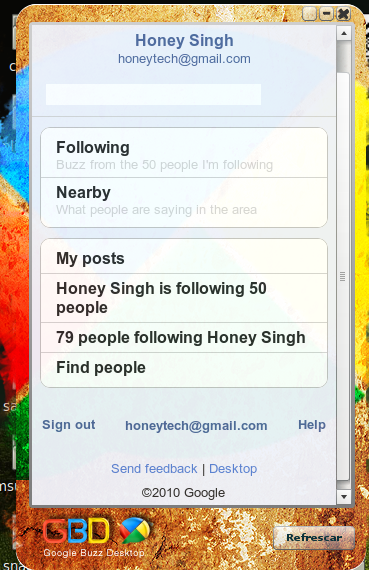
google buzz air desktop preview Google Buzz Desktop Application
Google buzz Desktop is a free application that bases it architecture in line with the Adobe air. Google buzz is one of the latest additions to the Gmail world, and the system is designed indigenously to enable the user to distribute or share images, video and many more. It even permits you to initiate discussion on the issue’s you require.

The Google Buzz desktop completely eliminates the requirement to Log-in to the Email account of the Google to use the Google buzz, this stream is completely taken care to be served right into your desktop, Thanks to the efficiency of the Adobe Air.

Possible options available with the Google Buzz:

  • Email account from Google – Gmail;
  • Chat enabled with contacts from Gtalk;
  • Google docs accessibility;
  • Compatibility to view your calendar; and many more.

The Google Buzz Desktop client is prepared completely inline to match up with the interface similar to the iphone buzz, thus enabling you to catch-up with the people who you follow-up and even patch-up with people whom you follow with.

Highlights of the feature packed Google Buzz desktop:

  • A Snappy Quick update is served right at your desktop for every couple of minutes.
  • Compatible to be commissioned on any operating system presently employed.

This tool is designed to promote the Google products, but still a complete package mainly intended to make all the Google apps to be accessed from a single window. It is surely another package typical of the Google stream, a class product that spells loads of convenience under one application.

How to install Google Buzz Desktop Application

1.Download Google Buzz air application. (You need to have adobe air for this )
2.Install Adobe air application. Below are the preview screen-shot’s while install this application.
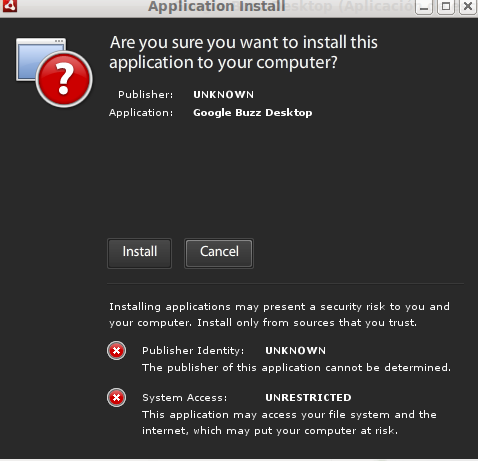
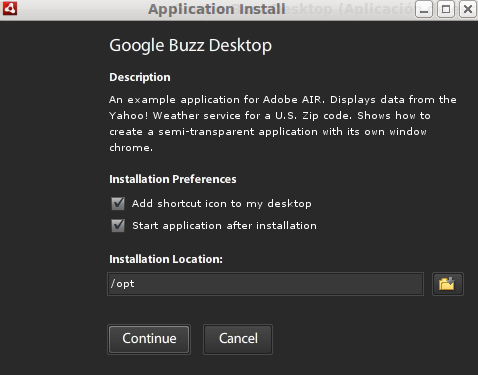
google buzz air Google Buzz Desktop Application

google buzz air desktop Google Buzz Desktop Application

google buzz air desktop install Google Buzz Desktop Application


Thanks for helping me
Share

You can follow any responses to this entry through the RSS 2.0 feed. You can leave a response, or trackback from your own site.

Similar Interesting Posts

Tutorials On

Designs

17 Tweets 2 Other Comments

30 Responses to “Google Buzz Desktop Application”

  1. This application is quite good you have not to logged in to gmail every time to see the buzz made by your friends. thanks for the share

  2. Google Buzz Desktop Application http://bit.ly/bqdEBn

    This comment was originally posted on Twitter

  3. Google Buzz Desktop Application http://goo.gl/fb/8ekKS

    This comment was originally posted on Twitter

  4. Google Buzz Desktop Application: Looking forward to share the information across the web with your Gmail friends, … http://bit.ly/b6A7dj

    This comment was originally posted on Twitter

  5. Google Buzz Desktop Application: Looking forward to share the information across the web with your Gmail friends, … http://bit.ly/b6A7dj

    This comment was originally posted on Twitter

  6. Google Buzz Desktop Application: Looking forward to share the information across the web with your Gmail friends, … http://bit.ly/b6A7dj

    This comment was originally posted on Twitter

  7. Google Buzz Desktop Application: Looking forward to share the information across the web with your Gmail friends, … http://bit.ly/b6A7dj

    This comment was originally posted on Twitter

  8. Google Buzz Desktop Application – Looking forward to share the information across the web with your Gmail friends, … http://ow.ly/17aA28

    This comment was originally posted on Twitter

  9. Google Buzz Desktop Application http://bit.ly/df8bwM

    This comment was originally posted on Twitter

  10. Google Buzz Desktop Application: Looking forward to share the information across the web with your Gmail friends, … http://bit.ly/d29G2g

    This comment was originally posted on Twitter

  11. Google Buzz Desktop Application http://bit.ly/c1MFpP

    This comment was originally posted on Twitter

  12. Google Buzz Desktop Application: Looking forward to share the information across the web with your Gmail friends, … http://bit.ly/d29G2g

    This comment was originally posted on Twitter

  13. Google Buzz Desktop Application http://bit.ly/d8BhID #google #buzz #app

    This comment was originally posted on Twitter

  14. Google #Buzz Desktop: I don’t recommend installing it but a nice try! http://bit.ly/b4wOmT

    This comment was originally posted on Twitter

  15. Google Buzz Desktop Application http://is.gd/bQ1Lf

    This comment was originally posted on Twitter

  16. Google Buzz Desktop Application http://is.gd/bQ1Lf

    This comment was originally posted on Twitter

  17. Google Buzz Desktop Application http://is.gd/bQ1Lf

    This comment was originally posted on Twitter

  18. Google Buzz Desktop Application http://is.gd/bQ1Lf

    This comment was originally posted on Twitter

Leave a Reply

Why ask?

    Thanks for helping me

    How to vote:

    Click on vote button http://bit.ly/cKNIrf

    For Guest Blogging

    Honeytech Blog is open for guest blogging, you can apply now and become one of our proud authors.

    Follow @honeytech On Twitter

    Is at 97.1 WQHT station of radio companion, w00t ! http://twitpic.com/2kmfo1
  • Sponsors Zone

  • Subscribe For Tips


  • Top Fans Of The Day

  • Mobile Applications

Top ↑

Hot Tags

mistakes Social media blogging mobile Designs browser Linux WordPress Plugin iphone google Web design Internet Windows Social free tips ubuntu open source How to Firefox