

How to check Broken Links of Wordpress Blogs
Sometime we have errors in the links because of change in url locations and sometimes referring links in the posts floats “404 errors”. We also have possibilities that Wikipedia images used in our posts may be deleted, linking sites in the posts may expire or may stop working. All these errors comes under observations when you have an eye over the response of all the urls associated with your blogs. It is quite impossible to check all the links manually if you have more than 1000 posts in your blogs.
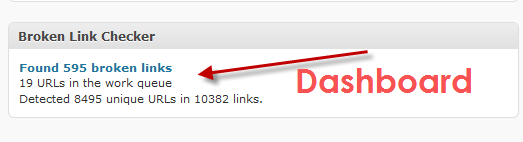
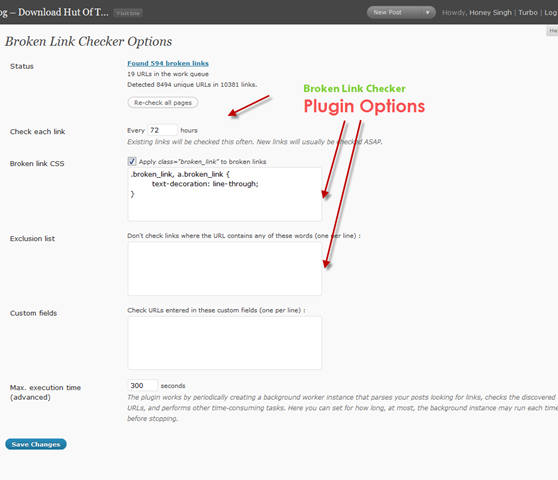
Broken Link Checker is a WordPress plugin which automatically checks all the post and pages for errors in links and images. It will auto notify about the errors at the Wordpress Dashboard. This plugin checks for the errors within defined interval of time(you can change the time interval from the plugin options)
Dashboard Demo of the Broken Link Checker
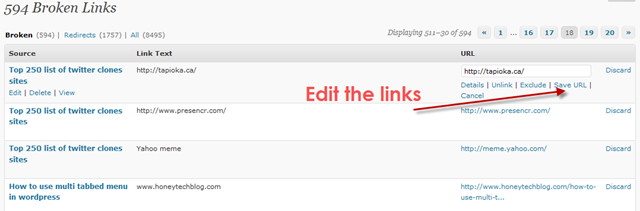
Editing and Management of Broken Link Checker
Broken Link Checker – Plugin Options
You can follow any responses to this entry through the RSS 2.0 feed. You can leave a response, or trackbackfrom your own site.
Subscribe to our FREE Rss FeedWhat's Hot
Similar Interesting Posts
- How to add featured content slider into wordpress blog
- 100+ Collected Great WordPress Video Tutorial List
- How to hide a categories posts from Home page without using any plugin
- Top 26 reasons to go for wordpress 2.6
- How to fix IE6 PNG Transparency issues in wordpress
- Affiliate Marketing through Wordpress Tool
- How to decide the robots.txt for Wordpress blogs
- 101 List Of Awesome Wordpress Tips and Resources
- How to hide a categories posts from wordpress RSS Feeds without using any plugin
- How to make Wordpress site much faster and responsive
- How to redirect wordpress.com blog to self hosted domain
- How to show RSS feeds in a Wordpress Page and Posts
- Top 40 Featured WordPress Video Tutorials
- 10+ Most Popular WordPress Plugins
- How to update your blog to wordpress 2.7
Tutorials On


September 22nd, 2009 at 11:09 am
RT @honeytech How to check Broken Links of Wordpress Blogs http://bit.ly/1amlhX
September 22nd, 2009 at 11:09 am
RT @honeytech How to check Broken Links of Wordpress Blogs http://bit.ly/1amlhX
October 20th, 2009 at 5:39 pm
Crosscheck all your broken links in #Wordpress blogs http://bit.ly/gK7aR
October 20th, 2009 at 5:39 pm
Crosscheck all your broken links in #Wordpress blogs http://bit.ly/gK7aR
November 14th, 2009 at 1:35 am
Great work admin!