
 Do you want to get a eye catchy graphics without digging your hands? Do you want to create stylised text blocks, buttons, or logos?
Here is Art Text with a reasonable ,affordable and easy-to-use graphics tool. It can also make you export your work in a variety of printing and graphic media formats like TIFF, JPEG, PDF, EPS, GIFF and PNG.
Short Info About Art text
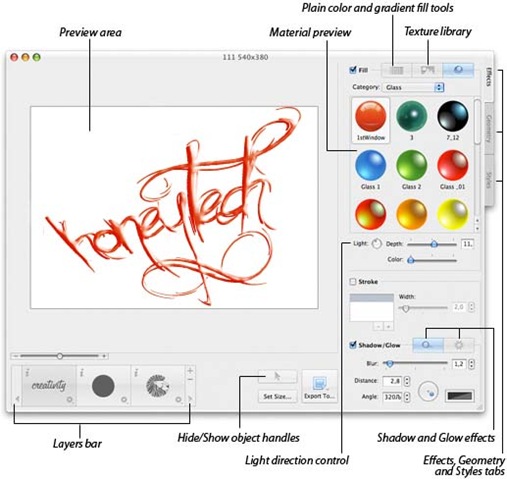
Art Text is a Mac OS X application to create high quality textual graphics, icons ,headings ,buttons , logos and even warm web site elements .Support of multi layer (just like Photoshop and Gimp )creating complex graphics with panic works. Use the result with Apple iWork, iWeb, Microsoft Office, BeLight applications, and various other text edit and web design programs.
by _rathernot
Silent Features Of Art Text
- It have collection of 190+ supplied textures.
- It can Adjustable shadow and glow effects
- It have radial and Linear gradient options
- Color or texture fill capability
- Unlimited strokes allow to outline text or artwork with different colors
- Warp text using 22 adjustable vector transformation shapes or Bezier splines
- Blend Modes allow layers to overlap each other with different effects, which helps to mask or partially shade images
- 50 Bitstream fonts (on professional /purchased edition)
- Shading Pro tool offers over 245 ready-made surface materials and ability to create your own one
- Collection of 190+ supplied textures.
- It can adjust shadows and glow effects
- Radial and Linear gradient options
- Color or texture fill capability
- Unlimited strokes allow to outline text or artwork with different colors
- Warp text using 22 adjustable vector transformation shapes or Bezier splines
- Blend Modes allow layers to overlap each other with different effects, which helps to mask or partially shade images
- It have 50 Bitstream fonts (on professional /purchased edition)
- Shading Pro tool offers over 245 ready-made surface materials and ability to create your own one
- It have Multiple layers
- It have Link Back technology
- Export into a file or clipboard in TIFF, JPEG, PDF, EPS, GIFF and PNG formats
- It have ability to print the created artwork.
- It have 200+ ready made templates that will enrich your text and web documents;
- It have 100+ pre-designed styles aimed at a quick creation of headings, icons, logos and web buttons
- Flip, rotate and control opacity of objects
- Multiline text support.
- 600 supplied vector icons and shapes, and ability to use your own

Art Text v2.0.2 (38.6 M):
Primary download • Alternative download
Comments
2 responses to “How to easily create stylised text blocks, buttons, logos on Mac”