

How to redirect wordpress.com blog to self hosted domain
I have honeytech.wordpress.com which is 4 year and have enough organic traffic. About 1.5 years ago i transferred that into a new domain honeytechblog.com but forget to redirect old domain into new one, as a result i have severe content duplicity issues over honeytechblog.com and hence its page rank decreased.
Note: This posts aims to educate people who plans to shift from WordPress.com or already moved into self hosted domain from leaving WordPress.com. This post helps you in avoiding content duplicity issues, conflicts with search traffic, conserve the old user base and enforce your new blog with the old energy.
What we are going to teach you?
We are going to tell you how to move yourblog.wordpress.com to your self hosted new domain i.e www.yourdomain.com with the help of domain mapping in WordPress.
Note: Your main blog will stop working un-till you complete the Step 7.
Here are the Steps by Steps process to follow:
Step1
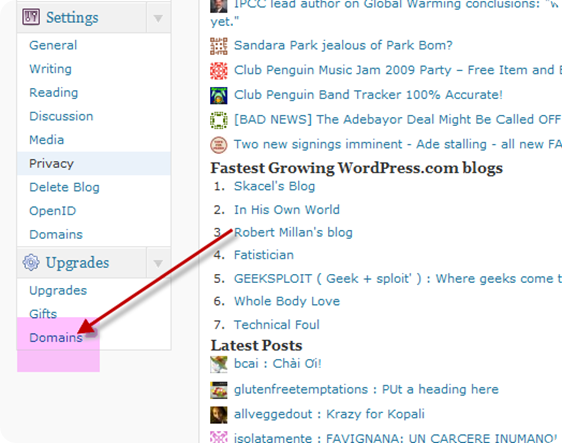
Go to your wordpress.com dasboard and find the options of Domains. Settings>Domains
Step2
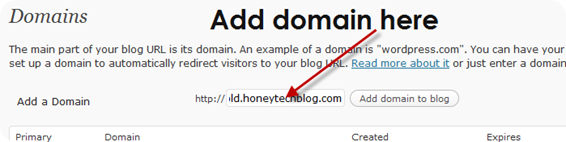
In the add domains options enter the domain of your new blog
Step3
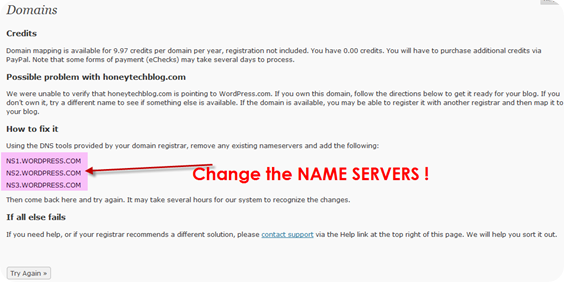
It will ask for the domain authorization and require the change of NAME SERVERS to NS1.WORDPRESS.COM ,NS2.WORDPRESS.COM
Step4
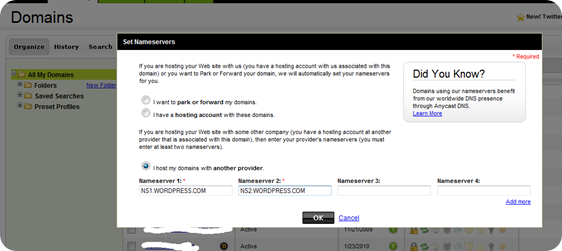
Go to your domain registrar (where your domain is located) and write down the name servers used for your domain and then replace it with WordPress name Sevres described in above step3.
Step5
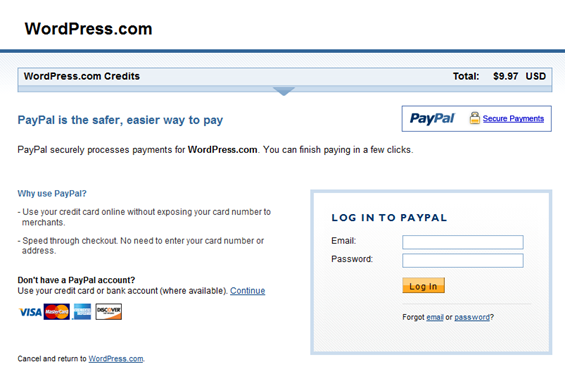
Buy the WordPress credits of $9.97 which is necessary for domain upgrade and is valid for one year. In order to continue this mapping you need to renew this every year.

Step6
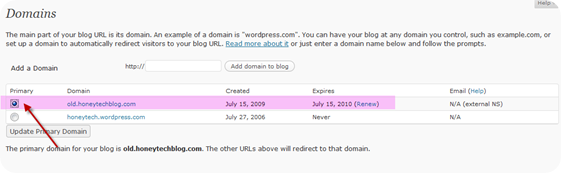
From the WordPress.com dashboard change the primary domain to your new domain(In the below image i choose my primary domain to old.honeytechblog.com instead for main. I do so to avoid the downtime in heavy traffic site, in upcoming posts i’ll publish the whole case study of moving honeytech.wordpress.com to honeytechblog.com. )
Step7
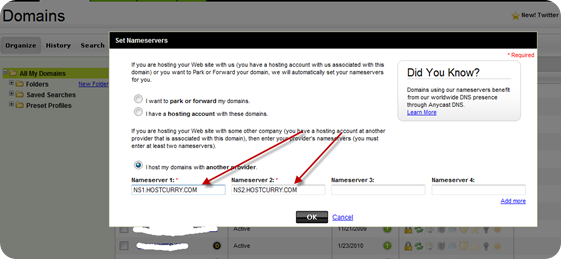
Now your WordPress.com blog is successfully mapped with new domain so you need to change the NAME SERVERS again to the old one. In Step4 you already note down the old NAME SERVERS ! 
Note: The above described process are very simple to implement but I need to move the WordPress.com blog into a heavy traffic site honeytechblog.com and i don’t want to face any downtime. I successfully implemented that with the help of creating a sub-domain old.honeytechblog. Don’t get more curious, wait for my upcoming post and subscribe to our FREE Rss Feed to the the instant updates !
You can follow any responses to this entry through the RSS 2.0 feed. You can leave a response, or trackbackfrom your own site.
Subscribe to our FREE Rss FeedWhat's Hot
Similar Interesting Posts
- [important] Before buying a domain
- How to optimize website loading time and performance
- Free domains
- How to choose your web hosting according to your requirements
- How to auto add excerpt in the wordpress blog home page
- 101 List Of Awesome Wordpress Tips and Resources
- How To Update your Blog If You Don’t Have Enough Time
- How to update your blog to wordpress 2.7
- How to show RSS feeds in a Wordpress Page and Posts
- How to add featured content slider into wordpress blog
- Free Dns services
- How to use multi tabbed menu in wordpress
- How to add poll in your blog
- Makeover of Private Blog at HoneySingh.com
- Affiliate Marketing through Wordpress Tool
Tutorials On


January 1st, 1970 at 5:30 am
July 18th, 2009 at 4:55 pm
How to redirect wordpress.com blog to self hosted domain http://is.gd/1DcsG
July 18th, 2009 at 7:33 pm
How to redirect wordpress.com blog to self hosted domain http://bit.ly/aKYkD
July 18th, 2009 at 7:51 pm
How to redirect wordpress.com blog to self hosted domain http://is.gd/1DcsG (via @honeytech)
July 18th, 2009 at 10:58 pm
How to redirect wordpress.com blog to self hosted domain http://bit.ly/1fpGyA
July 18th, 2009 at 11:40 pm
good and nice post,thanks for your sharing friend!!!
July 18th, 2009 at 9:20 pm
can it be a useful one. in order of upgrading the wordpress account, we can develop our own site……
July 18th, 2009 at 9:27 pm
Here our main motive is to drag the traffic of the old blog into new one. Once you work hard on worpress.com then why to waste that !Secondly, i practically ignored this and now regretting why didn't i do this 1 year before !Ps: Do this only is your wordpress.com blog have good traffic and your second blog have imported contents !
July 19th, 2009 at 1:56 pm
How to redirect wordpress.com blog to self hosted domain http://is.gd/1DcsG (via @honeytech)
August 3rd, 2009 at 12:10 am
Thanks for all the information!
August 3rd, 2009 at 12:12 am
@Josh
Your welcome, L’me know if you faced any issues with the redirection and optimizations !
August 10th, 2009 at 10:40 pm
hey honey, can i have some advertisments on wordpress.com blog like we have in blogger. if yes, get me some options.
August 11th, 2009 at 3:52 pm
Ik zag iets over een domein upgrade van WP naar eigen site @fmhtn Ben benieuwd of dit zou lukken http://bit.ly/9BRQf
August 11th, 2009 at 5:51 pm
You can offer advertisements over free wordpress.com blog.
Have a look over Wordpress.com TOS
http://en.wordpress.com/tos/
August 12th, 2009 at 2:24 am
@yoast Weet jij hier ‘t antwoord op? http://bit.ly/153Bwa Is dit de enige oplossing? http://bit.ly/9BRQf
August 27th, 2009 at 11:32 am
thank you for information.
September 2nd, 2009 at 7:26 pm
Nice blog. We hope do not forget to visit us and We also hope can establish good relationships and good friends
bondan´s last blog ..Backlink Generator Software
September 4th, 2009 at 2:54 pm
this site is very useful for all the seo users
September 7th, 2009 at 11:36 pm
Thanks for this tutorial in moving a Wordpress blog.
Sometimes it can be hard to import large XML files from Wordpress into your own server. Here’s a solution I have posted on my blog. Hope it helps someone:
http://www.content.after5pc.net/how-to-import-a-large-wordpress-xml-file-and-override-the-default-limits/144.html
September 9th, 2009 at 2:43 pm
@globetrotteri will this be of any help http://bit.ly/2AHHIU ?
September 27th, 2009 at 7:08 pm
Hey, you have a great blog here! I’m definitely going to bookmark you! Thank you for your info.And this is bookmarkth.com site. It pretty much covers DoFollow Social Bookmark related stuff.
Thank.
October 1st, 2009 at 12:44 pm
Surely changing the nameserver could do the trick. But there’s another way to complete redirection to another site: simply edit .htaccess config file in your root directory and enable the mod_rewrite to complete your rewrites (RewriteEngine On).
November 26th, 2009 at 12:23 pm
Thanks Honey for sharing this information.
I am facing a problem now a days, I appreciate if you can clear the fog.
I have a blog hosted on wordpress.com and I have a huge RSS network on this site. Now,I am planning to host that on my own server and new domain. I am clear with your instructions to redirect old blog to new blog. But how it will affect to my old RSS feed URL and subscriber? Any ways to redirect them as well?
Anil Gupta´s last blog ..JOGS – Completed with lots of joy!
November 26th, 2009 at 2:42 pm
@Anil
Just follow the process to redirect old blog traffic to new blog via .htaccess
http://www.phpcollection.com/redirect-old-blog-traffic-to-new-blog-via-htaccess.html
December 5th, 2009 at 12:33 am
I am successfully moving along your step by step process. Can you go over step 7 again, What are we putting in for nameserver? is it the new site that we currentltly want to be redirected for example… NS1.EXAMPLE.COM ?
Thanks
Kevin
December 5th, 2009 at 12:39 am
@Kevin
On Step7 you need to enter the old DNS of your website i.e the DNS of your web hosting.
You need to change the DNS to Wordpress just for the verification and in the end you need to revert back the DNS with the main web hosting DNS records.
Feel free to bother me in case you are still unclear on step7.
December 8th, 2009 at 10:18 pm
@AmberOliver http://www.honeytechblog.com/how-to-redirect-wordpress-com-blog-to-self-hosted-domain/
January 30th, 2010 at 12:14 pm
have i told you that i love you very much thank you very very much, you?re the best.
March 19th, 2010 at 11:21 am
This is great information – I Have implemented based on your instructions – I’m assuming that this will include your blog in wordpress tag searches etc.?? If so this is even more fantastic! Thanks!