

How to redirect wordpress.com blog to self hosted domain
Initially my first blog was on wordpress.com (honeytech.wordpress.com) and have good amount of organic traffic. As you already know there are few limitations on every free services so i planned to transferred it into a new domain honeytechblog.com. About 1.5 year ago i committed many mistakes while transferring WordPress to self hosted blog. I completely forget to redirect old domain into new one, as a result i have severe content duplicity issues over old blog and new blog. Moreover i looses the natural traffic of my old blog.
Note: This posts aims to educate people who plans to shift from WordPress.com or already moved into self hosted domain from leaving WordPress.com. This post helps you in avoiding content duplicity issues, conflicts with search traffic, conserve the old user base and enforce your new blog with the old energy.
How to redirect wordpress.com blog to self hosted domain
We are going to tell you how to move yourblog.wordpress.com into your self hosted new domain i.e www.yournewdomain.com with the help of domain mapping in WordPress.
Note: Your main blog will stop working un-till you complete the Step 7.
Here are the Steps by Steps process to redirect wordpress.com blog to self hosted domain
Step1
Step1
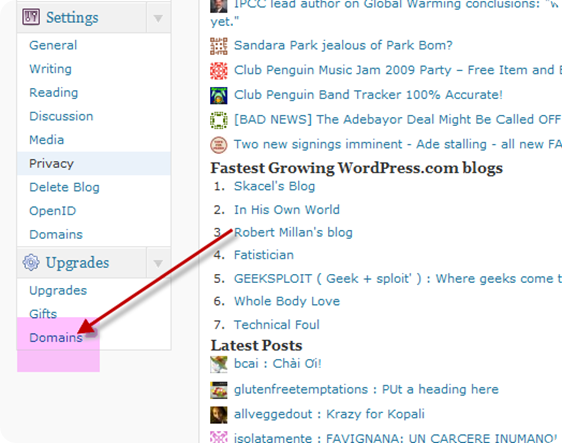
Go to your wordpress.com dasboard and find the options of Domains. Settings>Domains
Step2
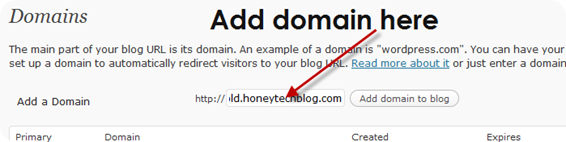
In the add domains options enter the domain of your new blog
Step3
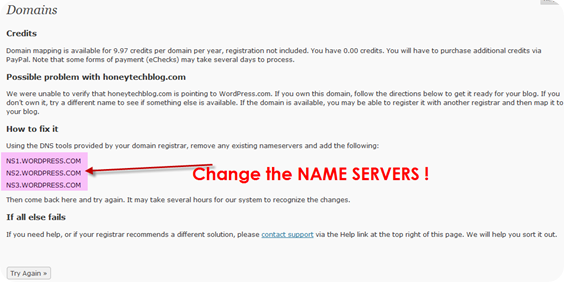
It will ask for the domain authorization and require the change of NAME SERVERS to NS1.WORDPRESS.COM ,NS2.WORDPRESS.COM
Step4
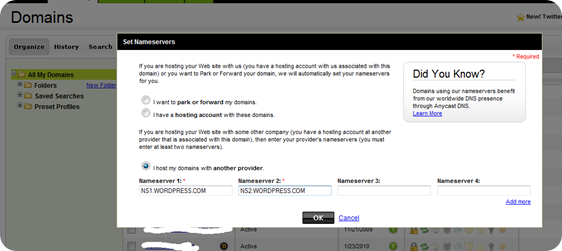
Go to your domain registrar (where your domain is located) and write down the name servers used for your domain and then replace it with WordPress name Sevres described in above step3.
Step5
Buy the WordPress credits of $9.97 which is necessary for domain upgrade and is valid for one year. In order to continue this mapping you need to renew this every year.
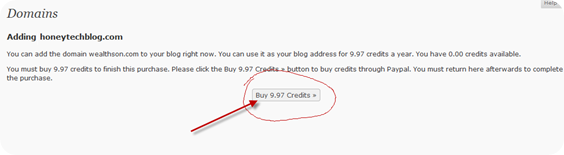
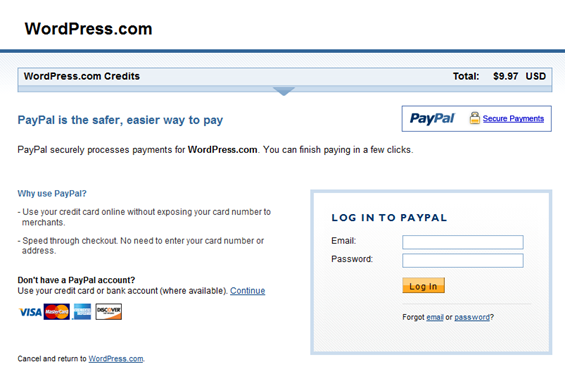
Step6
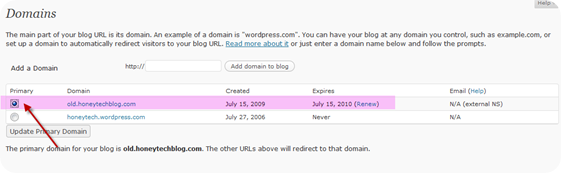
From the WordPress.com dashboard change the primary domain to your new domain(In the below image i choose my primary domain to old.honeytechblog.com instead for main. I do so to avoid the downtime in heavy traffic site, in upcoming posts i’ll publish the whole case study of moving honeytech.wordpress.com to honeytechblog.com. )
Step7
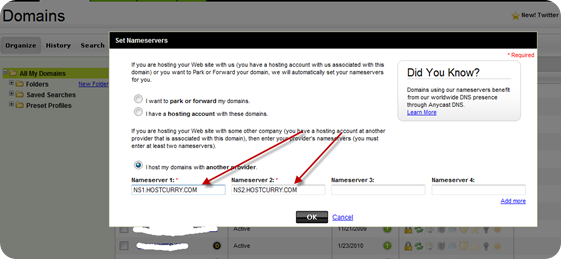
Now your WordPress.com blog is successfully mapped with new domain so you need to change the NAME SERVERS again to the old one. In Step4 you already note down the old NAME SERVERS !
January 1st, 1970 at 5:30 am
July 18th, 2009 at 4:55 pm
How to redirect wordpress.com blog to self hosted domain http://is.gd/1DcsG
July 18th, 2009 at 7:33 pm
How to redirect wordpress.com blog to self hosted domain http://bit.ly/aKYkD
July 18th, 2009 at 7:51 pm
How to redirect wordpress.com blog to self hosted domain http://is.gd/1DcsG (via @honeytech)
July 18th, 2009 at 9:20 pm
can it be a useful one. in order of upgrading the wordpress account, we can develop our own site……
July 18th, 2009 at 9:27 pm
Here our main motive is to drag the traffic of the old blog into new one. Once you work hard on worpress.com then why to waste that !Secondly, i practically ignored this and now regretting why didn't i do this 1 year before !Ps: Do this only is your wordpress.com blog have good traffic and your second blog have imported contents !
July 18th, 2009 at 10:58 pm
How to redirect wordpress.com blog to self hosted domain http://bit.ly/1fpGyA
July 19th, 2009 at 1:56 pm
How to redirect wordpress.com blog to self hosted domain http://is.gd/1DcsG (via @honeytech)
August 3rd, 2009 at 12:12 am
@Josh
Your welcome, L’me know if you faced any issues with the redirection and optimizations !
August 10th, 2009 at 10:40 pm
hey honey, can i have some advertisments on wordpress.com blog like we have in blogger. if yes, get me some options.
August 11th, 2009 at 3:52 pm
Ik zag iets over een domein upgrade van WP naar eigen site @fmhtn Ben benieuwd of dit zou lukken http://bit.ly/9BRQf
August 11th, 2009 at 5:51 pm
You can offer advertisements over free wordpress.com blog.
Have a look over WordPress.com TOS
http://en.wordpress.com/tos/
August 12th, 2009 at 2:24 am
@yoast Weet jij hier ‘t antwoord op? http://bit.ly/153Bwa Is dit de enige oplossing? http://bit.ly/9BRQf
August 27th, 2009 at 11:32 am
thank you for information.
September 2nd, 2009 at 7:26 pm
Nice blog. We hope do not forget to visit us and We also hope can establish good relationships and good friends
.-= bondan´s last blog ..Backlink Generator Software =-.
September 4th, 2009 at 2:54 pm
this site is very useful for all the seo users
September 7th, 2009 at 11:36 pm
Thanks for this tutorial in moving a WordPress blog.
Sometimes it can be hard to import large XML files from WordPress into your own server. Here’s a solution I have posted on my blog. Hope it helps someone:
http://www.content.after5pc.net/how-to-import-a-large-wordpress-xml-file-and-override-the-default-limits/144.html
September 9th, 2009 at 2:43 pm
@globetrotteri will this be of any help http://bit.ly/2AHHIU ?
September 27th, 2009 at 7:08 pm
Hey, you have a great blog here! I’m definitely going to bookmark you! Thank you for your info.And this is bookmarkth.com site. It pretty much covers DoFollow Social Bookmark related stuff.
Thank.
October 1st, 2009 at 12:44 pm
Surely changing the nameserver could do the trick. But there’s another way to complete redirection to another site: simply edit .htaccess config file in your root directory and enable the mod_rewrite to complete your rewrites (RewriteEngine On).
November 26th, 2009 at 12:23 pm
Thanks Honey for sharing this information.
I am facing a problem now a days, I appreciate if you can clear the fog.
I have a blog hosted on wordpress.com and I have a huge RSS network on this site. Now,I am planning to host that on my own server and new domain. I am clear with your instructions to redirect old blog to new blog. But how it will affect to my old RSS feed URL and subscriber? Any ways to redirect them as well?
.-= Anil Gupta´s last blog ..JOGS – Completed with lots of joy! =-.
November 26th, 2009 at 2:42 pm
@Anil
Just follow the process to redirect old blog traffic to new blog via .htaccess
http://www.phpcollection.com/redirect-old-blog-traffic-to-new-blog-via-htaccess.html
December 5th, 2009 at 12:33 am
I am successfully moving along your step by step process. Can you go over step 7 again, What are we putting in for nameserver? is it the new site that we currentltly want to be redirected for example… NS1.EXAMPLE.COM ?
Thanks
Kevin
December 5th, 2009 at 12:39 am
@Kevin
On Step7 you need to enter the old DNS of your website i.e the DNS of your web hosting.
You need to change the DNS to WordPress just for the verification and in the end you need to revert back the DNS with the main web hosting DNS records.
Feel free to bother me in case you are still unclear on step7.
January 30th, 2010 at 12:14 pm
have i told you that i love you very much thank you very very much, you?re the best.
March 19th, 2010 at 11:21 am
This is great information – I Have implemented based on your instructions – I’m assuming that this will include your blog in wordpress tag searches etc.?? If so this is even more fantastic! Thanks!
April 7th, 2010 at 9:42 pm
Hey, thanks for this tip. I finally got around to redirecting my old wordpress.com blog. I wasn’t sure what to do since I had launched a new blog on a self-hosted domain and used content from an old wordpress.com blog. I was aware of potential duplicate content issues, but my old site was still getting a fair amount of traffic.
I had a few issues since I had changed my link structure to remove the date. Redirection was a good plugin to solve this problem, though its documentation isn’t very good.
It took about 30 minutes for wordpress.com to be able to verify the new name servers prior to switching them back.
thanks again,
Jarret
April 8th, 2010 at 1:44 am
@Jarret
Cheers for redirecting your old readers into your new base !
April 26th, 2010 at 9:21 am
Hi and thank you for the post,
I am a bit nervous about the redirect as I’m fairly ignorant to the results of what each step is doing. I have my site hosted with an entirely different theme that I purchased and then modified.
My old blog hosted on wordpress.com is a theme I’d like to abandon. What I am understanding is that you essentially move your own domain and point it at the old one, and then (once verified) you point the wordpress.com back to the self hosted site at the same domain name. Is that correct?
I am happy you have created this resource. I appreciate your blog.
Marty
April 26th, 2010 at 12:07 pm
@marty
Your understanding is absolutely correct.
First verify the domain then upgrade and redirect the wordpress.com blog into self hosted.
Feel free to drop your question in case you have any issues in transferring wordpress.com blog to self hosted domain.
Cheers,
May 3rd, 2010 at 11:53 pm
So after you transfer, pay for the upgrade domain mapping, how does this affect your PR, and traffic that you have built will it transfer with the redirect. I have heard this is a 302 so it will not and you need a permanent 301 redirect to retain the traffic. Is any of this true?? Thanks
May 4th, 2010 at 1:47 am
@drinkingdanny
When i redirect wordpress.com blog to self hosted then PR remains same but traffic increases.
The default domain mapping from wordpress.com have 302 redirects which mean “temporary redirect”.
For newbies wordpress.com have higher PR n SEO values as compared with their new domain.
For me self-domain is more important than PR n SEO (as i can manage it latter).
You have all the options open
May 4th, 2010 at 6:22 pm
Thanks so much for getting back to me so quickly. That makes sense and In understand in the long term you definitely want to self-host.. One question I pose is can a programmer hard-code page by page a permanent redirect? At my company they want to take the blog and use a platform that’s Cold Fusion and bring the blog on to their site. Is such a thing possible to hard code a 301 direct with the blog?
May 4th, 2010 at 7:13 pm
Upto my understanding domain mapping is best available solution for longer terms.
We just need to drive the traffic for starting years only to sustain a new domain. After a year only all the old readers and community will automatically shift onto our main domain.
You can’t hardcode 301 for wordpress.com but you can use google webmaster central for customizing the 301 experience for old blog.
May 15th, 2010 at 4:39 pm
Hi. I needed to drop you a speedy note to express my thanks. I’ve been following your web for a month or so and have picked up a ton of reliable information as tremendous as liked the way you have structured web page. I am attempting to operate extraordinarily websites but I think its too normal and I want to concentrate a number of on smaller topics. Being all things to all a lot is not all that its cracked up to be.
June 14th, 2010 at 3:13 am
Hello,
I have completed all these steps. I am aware that it may take time to switch finally but at the moment I cannot access either url. Is this normal?
December 9th, 2010 at 3:48 pm
Hi,
thank you for the site.I have my old blog eskonr.wordpress.com with content and created my site eskonr.com. I have done all the steps above to redirect to eskonr.com but the site doesnt seems to work (eskonr.com).
How many days will take to make it work ?
Your respnse is highlt appreciated really.
December 9th, 2010 at 4:40 pm
When ever i enter eskonr.com ,i can see the content from old blog(eskonr.wordpress.com) but if i do eskonr.com/wp-admin ,it is taking me to eskonr.wordpress.com/wp-admin ?
Why is it so happening ? since i need to add some plungins to my website(eskonr.com) which is not possible in wordpress blog .Response is highly appreciated.
February 8th, 2011 at 2:42 pm
Hello frd .I have completed all the step but did not redirect my blog.
Have a new technique ?