
 Are you looking for the solutions to produce a professional presentations and documentations that may facilitate a printer friendly UI (user interface)?
Their are several problems in printing the documents while switching the files between different computers and programs.For example – printing a resume created on Microsoft Word often discommode and unorganized whenever it is opened on Openoffice.The common solution to the problems is to create PDF based paperses but the question is how to create PDF files for office printing and professional documentations?
Dont worry the solutions is quite simple.
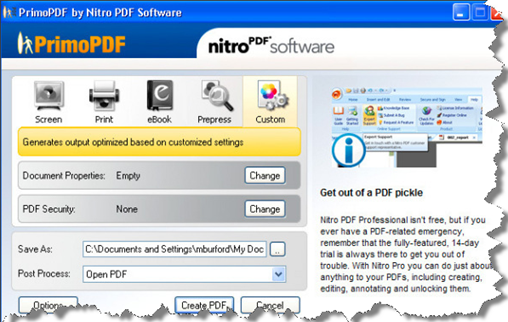
A simplest way to create PDF is PrimoPDF. Do you know its basically a free to use application for producing toned and professional quality PDF.It is capable of the conversion to PDF from very vast variety of files (more than 300).The tool based on windows applications and have a eye candy UI.It is an apotheosis for office printing and professional documentations.Moreover it have few extra charming features that includes the presence of security encryptions (128-bits) which secure your files with passwords and add document information’s.Do you know PrimoPDF also renders the PDF output for screen,online press ,ebook.It also have ability to combine different PDF files after they are converted.
Here is a simple video for using PrimoPDF
In case your want to go for advance version(paid) then you can also enjoy few advance functionality like Creating and design PDF forms ,steamlined drag-and-drop and batch PDF creation,Ability to stamp digitally sign, certified and secure PDF files.
Note:If you are linux user then a simple way of PDF creation is by the use inbuilt PDF export of Openoffice.In case you don’t have the knowledge on this please check how to export openoffice file to pdf .Alternatively windows users can also use this.
Comments
15 responses to “PrimoPDF – A free tool for prime quality conversion to PDF”