
Ubuntu 8.10 in Windows
In my previous post about Running Ubuntu Linux in Windows XP using VMware we have to use external applications but in the latest version of ubuntu you can install inside windows and this features with the default CD’s of Ubuntu ( latest version ). Ubuntu 8.10 comes with Mobility - Get Free CD’s and Downloads and follow this process:
1.Burn the Live CD and you insert it in you ROM DRIVE
You can use ImgBurn to burn your Ubutu iso
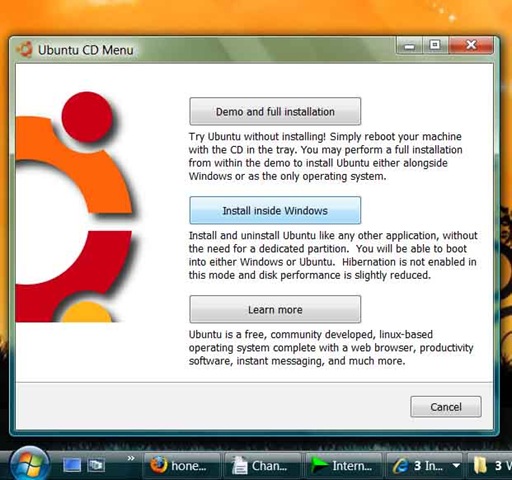
2.The Auto Run will bring the below screen which ask for
- Demo and Full installation
- Install inside Windows
- Learn More
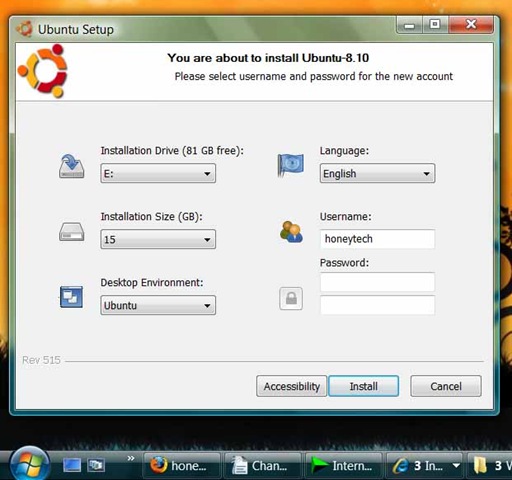
3.After clicking Install inside Windows you will get a simple screen and easily install your Ubuntu within the windows
Note: If you haven’t yet downloaded the latest version of Ubuntu then have your download from here.You can also pre order the free copy’s of the CD’s but it will takes 2-3 weeks so rather you can easily download it.If you already installed the Ubuntu then its easy to upgrade it.
Youtube Downloader
Find Domain age,Pagerank,Valid Pagerank, Directory Listing,Indexed Pages in Search Engines,Web Archive, Alexa Traffic and Graph
Free Premium RapidShare and MegaUpload Accounts
Watch Live Tv
Free Tools
You can follow any responses to this entry through the RSS 2.0 feed. You can leave a response, or trackback from your own site.
Subscribe to our FREE Rss Feed- Ubuntu[feisty 7.04] installer for Windows
- Ubuntu 8.10 comes with Mobility - Get Free CD’s and Downloads
- DriverMax - Download, backup and restore the drivers installed on your Windows Vista or Windows XP computer
- How to install Adobe AIR on Linux
- [Download time]Ubuntu 7.04 (Feisty Fawn)
- Whats new In Ubuntu 7.10
- How to run Linux directly from Windows
- How to restore Linux Grub
- How to update your blog to wordpress 2.7
- Bypass Windows Genuine Advantage WGA Validation:updated v1.7.17.0
- Ubuntu 8.04 Finally Released
- “APTonCD”-No problem Ubuntu
- Linspire/Lindows os download
- Wordpress 2.6.2 Released, How and Why to Upgrade it now?
- iTunes 8


November 3rd, 2008 at 12:20 pm
[...] From Blog: Ubuntu 8.10 in Windows http://www.honeytechblog.com?p=1978 [...]